Run experiments on local and SSH workers
Execution pools extend minimal-mode studies with local and SSH numerical workers. Install the current stable workspace or matching Python package on the coordinator.
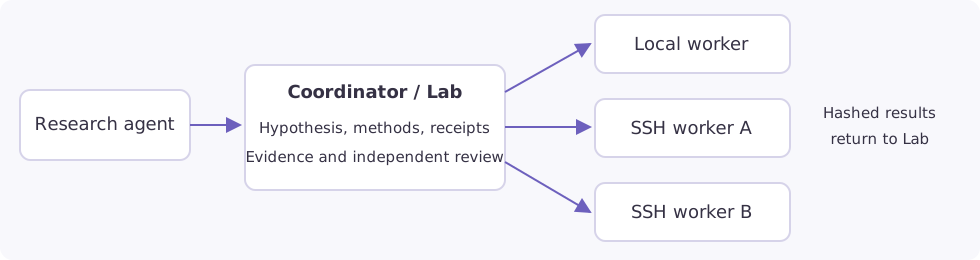
One Simjecture workspace owns the research agent, hypothesis, methods, reviews, experiment receipts and deadline. Each selected machine runs a headless execution worker. A worker needs Python and the numerical runtime, but no model subscription, provider key, web server or copy of the research supervisor. Local and SSH workers share the same versioned execution protocol and numerical launcher.
New solver builds can be registered during a study without re-preparing its frozen
worker. Add a separately named descriptor in an existing worker capability directory,
then call lab.register_capability("new-build", machine="node-a"). Use its returned
machine-scoped name for experiments and methods review. The host verifies original
instrument hashes and worker identity before appending it. See
building and qualifying a new runtime.
Prepare through the workspace
Open Machines → Add machine. Enter an SSH address and password, then click Connect & prepare. Addresses can be a normal command such as
ssh -p 23 root@host,user@host:port,ssh://user@host:portor an SSH config alias. An empty password uses your existing key/SSH agent.Preparation runs in the background. It detects the login account, visible CPU/RAM/GPU resources, chooses conservative budgets and a persistent worker directory, installs private Python 3.12, and verifies the numerical launcher. Root logins prepare an unprivileged
simjectureworker account. Bubblewrap is preferred; restricted containers select cooperative PRoot only when its probe succeeds under the unprivileged worker account. If both backends are blocked, preparation fails with a setup error. Root Debian/Ubuntu hosts can install the missing execution dependency. Other hosts show an actionable setup error when installation needs additional privileges.Advanced settings are optional. Override the display name, directory, resource budget, GPU IDs, execution environment, key path or instrument directories. Blank resource fields mean automatic detection;
nonein GPU IDs explicitly chooses CPU-only execution. Existing manual installations retain their paths and budgets when you edit settings.Machine cards show Online, Offline, Preparing, setup errors or stale checks, plus resource budgets, active jobs and the last-check age. The server sends lightweight heartbeats every 30 seconds, even when no browser is open. Heartbeats do not launch numerical jobs or rehash solver installations. Refresh checks availability immediately. A study launch still performs its full checks.
Prepare with agent opens a setup conversation with the registered machine selected. Choose your agent/model and send the prepared request. The agent can inspect the host, prepare the managed worker, run recorded SSH setup commands, and register actual instrument descriptor directories using the saved connection. Passwords are not placed in its prompt or tool arguments. Native CLI agents use the same workspace Python bridge. Scientific solvers, source views and tables must be registered on the worker; worker preparation does not download FLASH or copy licensed tables between machines. The worker account needs read/traverse access to every registered runtime and mount.
In Autonomous study, select the prepared workers under Experiment machines. Use minimal mode. Add this computer provides a managed local worker with one click. An empty study selection retains the existing local execution path. Machine Jobs shows readable receipts and cancellation controls.
Basic onboarding enrolls a new host key into a private, coordinator-managed
known_hosts file on first connection; subsequent key changes are rejected.
Existing manually configured SSH profiles retain strict pre-enrolled host-key checks.
The study and monitor show placement, remote job ID, GPU assignment and unreachable transport. Declared outputs appear in study results; recorded files held remotely have a Retrieve action. Direct and agent-guided continuation preparation retain registered machine selections. You can change the selection before launching the new phase. Register the parent’s machine IDs first when importing an external study.
Prepare through the CLI
Install simjecture[workspace] on the coordinator.
This includes the process monitor and the built-in API agent used in the example.
A coordinator using only native CLIs can use the smaller process extra; managed
local workers also need the process monitor.
Create node-a.json, substituting your host, login, paths and capacity:
{
  "id": "node-a",
  "label": "GPU workstation",
  "kind": "ssh",
  "host": "compute.example.org",
  "port": 22,
  "user": "research",
  "root": "/home/research/simjecture-worker",
  "python": "python3",
  "config": {
    "execution_backend": "bubblewrap",
    "cpus": 8,
    "memory_mb": 16384,
    "gpu_ids": ["0", "1"],
    "max_jobs": 2,
    "capabilities": ["/home/research/capabilities"]
  }
}
simjecture machines --registry ./machines add --file node-a.json
simjecture machines --registry ./machines prepare node-a
simjecture machines --registry ./machines check node-a
simjecture machines --registry ./machines status node-a

simjecture study --campaign ./runs/parallel-study \
  --hypothesis-file hypothesis.txt --instructions-file instructions.md \
  --mode minimal --backend builtin --model YOUR_MODEL \
  --provider-config /private/provider.json --wall-seconds 3600 \
  --machine-registry ./machines --machine node-a --machine node-b
Add and prepare node-b before selecting it. To include the coordinator as a
managed execution worker, register kind: "local" with an absolute worker root
and the Python executable from its installed environment.
Optional profile fields are identity_file, known_hosts, control_path and
run_as. OpenSSH multiplexing reuses connections automatically when no control
socket is supplied. Password authentication is supported; saved passwords stay in
mode-0600 private coordinator files, outside profiles and study manifests. Prefer
the GUI password field over putting a credential in a shell command or profile file.
Submit and inspect experiments
The generated lab.py client exposes the pool without changing hypothesis or
review rules:
from lab import lab
print(lab.machines())

receipt = lab.run(
    "calculation.py",
    inputs=["input.json"],
    outputs=["result.json", "figure.png"],
    capability="warpx-cuda--at-node-a",
    stage="exploration",
    resources={"cpus": 2, "memory_mb": 4096, "gpus": 1},
    timeout=600,
    key="commission-1",
)
print(lab.status())
Use an alias advertised by lab.machines(). An alias is bound to its worker;
plain Python jobs choose a worker automatically unless machine="node-b" is
specified. Submit multiple asynchronous jobs to obtain parallel execution.
Requests queue when their CPU/RAM/GPU reservation or concurrency slot is busy.
GPU IDs are distinct physical devices, verified at readiness. Assigned devices
set CUDA_VISIBLE_DEVICES; CPU-only jobs receive an empty value. A CUDA capability
must mount all devices that may be allocated to it. CPU counts are admission
reservations, not OS CPU quotas; request enough cores for MPI ranks and threads.
For single-node Open MPI, launch through the installed helper inside the experiment:
import os, subprocess, sys
subprocess.run([
    sys.executable, os.environ["SIMJECTURE_MPI_HELPER"],
    "--ranks", "16", "--", "./flash4",
], check=True)
Request resources={"cpus": 16, "memory_mb": 49152, "gpus": 0} for that example.
The helper supplies the reserved localhost slots and rejects excess ranks rather
than oversubscribing. It covers single-node Open MPI, not distributed MPI or other
MPI implementations. A successful one-rank smoke test does not qualify a 16-rank
launch: commission the exact worker, rank count, runtime and input bundle.
Source and dependency views are read-only. Inspect them through the bounded helper:
lab.read_instrument(capability="flash--at-node-a", root="runtime", path=".")
lab.read_instrument(
    capability="flash--at-node-a", root="runtime",
    path="source/Simulation/SimulationMain/example.F90", max_bytes=16000,
)
lab.fetch_remote(experiment=receipt["id"], path="diagnostics/fields.h5")
Choose a registered readable_roots entry for a source mount.
Keep analysis with its data
New studies use --artifact-policy remote. A completed worker returns its terminal
receipt and complete artifact index without downloading its outputs. Bulk fields,
checkpoints and archives remain on that worker. lab.status() reports the policy,
recorded hashes, artifact locations and logical storage consumption. Explicitly fetch
the compact results needed by lab.progress, lab.compare and independent review:
lab.fetch_remote(experiment=receipt["id"], path="result.json")
To analyze a retained file, submit the reader to the same worker:
analysis = lab.analyze(
    "reader.py",
    remote_inputs={
        "fields.h5": {"experiment": receipt["id"], "path": "diagnostics/fields.h5"}
    },
    outputs=["summary.json", "figure.png"],
    parent_experiment=receipt["id"],
    timeout=600,
)
# After analysis completes:
lab.fetch_remote(experiment=analysis["id"], path="summary.json")
lab.fetch_remote(experiment=analysis["id"], path="figure.png")
The source experiment must belong to this study and have a recorded terminal
artifact index. The host freezes its worker, job, path, SHA256 and size, and selects
that worker for the follow-up job. Before execution the worker copies and verifies
the data locally into an independent input file; there is no coordinator round trip
or shared writable hard link. Missing or changed data fail staging. Destination
names must be separate from source, other inputs and outputs. Cross-worker inputs
or capabilities are rejected; this interface does not implicitly migrate data.
Workers must advertise artifact_inputs; prepare a capable worker for a new study
if an older frozen worker lacks it.
remote_inputs is also accepted by lab.run, lab.method and lab.commit.
References participate in source-bound qualification and prospective commitments,
so changing a referenced dataset requires a matching method review. lab.analyze
remains exploratory. Fetch compact validation documents before methods review and
compact evidence documents before claim review. Review packets distinguish readable
documents from remote, uninspected raw data. Fetch relevant code/configuration
dependencies for source inspection; recorded hashes alone never qualify a method
or approve a scientific claim.
Retained remote data remain charged after a job finishes. The logical study allowance uses the larger of the local cache and the recorded remote footprint for each job, plus active reservations. Caching a replica does not charge it twice; a downstream job’s independent staged copy has its own charge. Physical free space on both hosts still matters. An explicit fetch failure leaves computation terminal and allows a later retry; successful cache publication requires a full SHA256 check.
Legacy collection and transfer recovery
--artifact-policy eager retains automatic import of declared outputs, input
programs and small text diagnostics. Existing study manifests without a policy
keep this behavior on resume. Policy is immutable within a study; changing it requires
a new study. In eager mode large explicitly declared outputs are transferred too.
Artifact retrieval uses one bounded stream of the worker’s existing fetch operation,
so older workers remain compatible. A stalled stream times out after 60 seconds
without a complete chunk; retries resume an identity-bound partial file. A complete
file becomes visible only after its full SHA256 matches the terminal worker receipt.
Partial data consume the same workspace storage allowance and can remain after an
interrupted transfer. Once a terminal worker receipt is observed, a temporary
transport failure does not turn that completed job into a timed-out simulation.
In eager mode, automatic collection stops at the study wall deadline: the observed remote terminal
status and partial file remain, and automatic retries resume after a budget extension.
A cancellation during collection stops the stream and retains the partial and remote
terminal status; automatic retries remain disabled for that cancelled collection.
An explicit fetch of a recorded artifact from a terminal worker, including deferred
or cancelled collection, does not inherit an expired study deadline. Fetching one
file does not finish deferred eager collection or approve a scientific claim. No numerical job is resubmitted. These checks do not guarantee a
particular throughput on an untested connection.
On filesystems with unstable directory inodes, the operator can provide a
.simjecture-source-manifest.json inside a reference dependency root. It maps
declared source paths to SHA256 hashes. The harness verifies every listed file’s
bytes and uses the manifest content as identity instead of device/inode numbers.
Keep the manifest and reference root protected by host permissions. It covers the
listed files, not unlisted additions. Symlink escapes, changed bytes and malformed
hashes fail validation. Introducing it changes the capability identity: qualify a
new phase/profile rather than changing an existing frozen study. Legacy references
without it retain their existing identity semantics.
Recovery, deadlines and boundaries
Job identity includes a persistent study UUID and the frozen experiment request. Lost upload/submission replies replay the same job. A coordinator restart reattaches to its detached worker process. An unreachable SSH transport remains distinct from an experiment failure; restored credentials or connections recover the existing job.
Queueing and network waits count against the original absolute study deadline. Workers enforce that deadline without the coordinator. If it expires while SSH is unreachable, the coordinator records an unconfirmed stop rather than claiming a verified cancellation. Explicit cancellation terminates recorded descendants and retains reservations while stopping is unconfirmed. A worker crash produces an interrupted receipt; a reboot does not silently rerun the same job.
Worker code, configuration, identity and runtime hashes are frozen for the phase. Keep old worker program generations and job directories for retrieval. Drain active jobs before changing worker configuration; changing routing requires draining active studies. Renewing authentication does not change experiment identity. Use a new phase to select changed workers or instruments.
Restricted GPU containers may require explicit proot-cooperative selection. It
provides filesystem views and execution limits, but no kernel or network isolation;
use trusted workers and programs. Native agent tools remain available on the
coordinator. This feature currently covers minimal-mode numerical experiments;
interactive chat simulations, remote agent hosting and Slurm submission are separate
paths.
For a trusted host where PRoot interferes with MPI, Machines → Settings → Advanced
settings → Experiment environment → Native process explicitly selects
process-cooperative. This runs under the unprivileged worker account with host
filesystem and network access. It retains frozen-input checks, deadlines, sampled
aggregate RSS limits and receipts, but supplies no OS isolation. Registered runtime
and source files need host permissions to remain read-only. Automatic detection does
not select this backend. See restricted hosts.
Earlier studies retain their frozen backend and worker configuration when the coordinator is upgraded.
Create a separate machine profile and worker root when changing an execution backend that old studies have frozen. Keep the original profile and program generation for retrieval. Profiles for the same SSH address/port share physical capacity: a study cannot select both, and an active reservation on either prevents allocating through the alternative. DNS aliases are not resolved into one physical-host identity.
Relationship to Simote
Simote and Simjecture remain independently usable. This pool uses ordinary OpenSSH and can run from a coordinator deployed by Simote. It does not require a master/slave Simote installation or a second research scheduler. Existing Simote agent-role and Slurm integrations remain separate; this change does not add a Simote profile importer or a Slurm worker adapter. See Simote agent roles.
See the two-host acceptance record for the actual numerical, solver, recovery and interface checks.