Run a headless study
Use this workflow for terminal sessions, scripts or browserless hosts. For an interactive first investigation, start with the research workspace.
Prerequisites
Use Linux or WSL, Python 3.11+ and uv. Install and
authenticate a supported native CLI separately. The choices are codex-glm,
codex, grok and agy; choose the model configured for that CLI. No particular
provider or subscription is required by this workflow. Keep credentials in the
agent’s own credential store, outside study directories and source control.
Install Bubblewrap using your distribution’s package manager (for example,
sudo apt install bubblewrap on Debian/Ubuntu). Then install the package
and check whether this host permits the required namespaces:
uv tool install simjecture
simjecture doctor --execution-backend bubblewrap
For other versions and source checkouts, see
installation. Bubblewrap is the default
numerical execution backend. If namespaces are unavailable, follow the
restricted-host guide before explicitly selecting
--execution-backend proot-cooperative on a dedicated non-root account. PRoot is
not an OS security boundary, and Simjecture never silently falls back to it.
Native agents retain their host tools and are not enclosed by the numerical sandbox.
Prepare and launch
Write a falsifiable hypothesis in hypothesis.txt. In instructions.md, specify
physical scope, available instruments, resource limits and the evidence needed to
accept or reject it. Review both files before launch: the operator’s question and
scope are frozen for the study.
Replace BACKEND_NAME and MODEL_ID with your installed backend and configured
model from the choices above, then choose a new campaign directory and budget:
BACKEND=BACKEND_NAME
MODEL=MODEL_ID
simjecture study --campaign ./runs/my-study \
  --hypothesis-file hypothesis.txt --instructions-file instructions.md \
  --backend "$BACKEND" --model "$MODEL" --wall-seconds 3600
The launch prints activity, backend/model, remaining time and experiment/review
counts. Redirected output uses periodic plain status lines; --quiet suppresses
progress. A study can make paid provider requests through the agent you selected.
The director and independent reviewers use the worker’s backend by default. To
use a different backend for these roles, set --judge-backend and
--judge-model; --judge-executable selects its CLI or wrapper. For example,
an API worker can use an independently authenticated Codex reviewer:
simjecture study --campaign ./runs/api-worker-native-review \
  --hypothesis-file hypothesis.txt --instructions-file instructions.md \
  --backend builtin --provider-config /private/worker-provider.json \
  --model WORKER_MODEL --judge-backend codex --judge-model REVIEW_MODEL \
  --judge-reasoning-effort high --wall-seconds 3600
Install the workspace extra for the built-in API agent. A built-in reviewer
can use its own --judge-provider-config; it inherits the worker’s provider
configuration when both use the built-in backend and no separate file is given.
API reviewer files must describe an API connection; select a native CLI with
--judge-backend rather than putting a CLI profile in that file.
The built-in agent calls the configured API directly through smolagents; it does
not run through DeepSeek Harness. It leaves the output-token budget to the provider
by default. An operator can set a positive integer max_tokens in the private
provider JSON to request an explicit ceiling; omit it or use null to retain
the provider default. Request metadata records this choice. Campaign deadlines
and hosted service allowances remain separate controls.
Native reviewers likewise inherit the worker’s CLI wrapper when sharing its
backend. A different backend uses its own CLI and login. Role settings are saved
with the launch request and reused on resume, including browser resumes. The
director and reviewers keep separate contexts and the existing review tool
restrictions; selecting another backend does not relax evidence requirements.
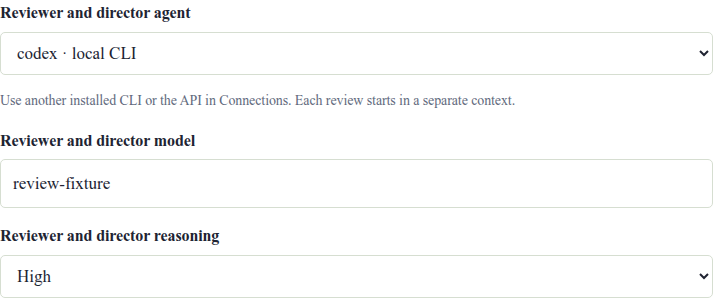
In the workspace, edit the proposal, open Execution settings, and choose Reviewer and director agent, its model and reasoning effort. The worker stays with the conversation’s selected agent. An API reviewer uses the endpoint saved in Connections; its settings are frozen separately for that study. The hosted demo keeps its agents managed by the host. Existing studies retain their saved roles; these controls select roles for a new study and do not change a running one.
An operator can extend an active study without relaunching it:
simjecture study extend --campaign ./runs/my-study --hours 12.
Use simjecture study budget --campaign ./runs/my-study for its current clock.
New minimal studies expose all available installed tools by default. The agent
selects the tool for each experiment. Use --capabilities DIR for a restricted
registry or --capabilities none for Python only. Resume uses the existing
frozen registry and does not rediscover installations. See
combining tools for qualification and handoffs.
Mode, agent and numerical execution are separate choices:
--backendand--modelchoose the native agent and its configured model--mode minimalis optional; minimal is the only supported workflow--execution-backendchooses how recorded numerical experiments execute--director(minimal default) enables bounded strategy reviews and named experiment stops;--no-directordisables it for the new study
In minimal mode, the CLI defaults to --completion-policy repair: an independently supported root,
or an accepted falsification followed by a supported repair, can complete it.
Choose --completion-policy answer to also allow an independently accepted root
falsification to finish the investigation, as the workspace does for new studies.
See minimal-mode evidence and review for the full contract.
The configured built-in API agent is another advanced option; it uses a private
--provider-config file and supports minimal mode only. See the
command reference. For removed workflows and older
integrations, see migration.
Inspect, pause and resume
Inspect the same campaign from another terminal or the local browser:
simjecture status ./runs/my-study
simjecture watch ./runs/my-study
simjecture web ./runs/my-study
simjecture pause ./runs/my-study
simjecture resume ./runs/my-study
status is a snapshot; watch follows progress, and Ctrl-C stops only the viewer.
For a foreground restart, repeat the original study command with the same
campaign path and launch options. The recorded mode, completion policy and original
wall deadline stay fixed. Pause stops the agent at its supervisor boundary; recorded
jobs may still finish within their existing bounds. Provider retry time and pauses
count against the wall deadline. Transient disconnects retry with backoff, while
authentication, permission and exhausted-quota errors pause for attention.
A normal agent exit or inconclusive result does not complete research. To continue beyond the original budget, prepare a linked phase with a new budget and selected prior files using continuation and steering.
Start from a working instrument
For expensive solver setup, provide a guided commissioning package: exact working source and command, an output reader, observable, validation checks, runtime and known limitations. Reproduce that anchor in a separate bounded readiness run before hypothesis testing.
simjecture study --campaign ./runs/guided-study \
  --hypothesis-file hypothesis.txt --instructions-file instructions.md \
  --guided-commission /path/to/guided_commission.json \
  --capabilities /path/to/installed-capabilities \
  --backend "$BACKEND" --model "$MODEL" --wall-seconds 3600
Guided examples are starting instruments, not fresh evidence for a new hypothesis. Follow guided commissioning for the package format and readiness budget, runtime deployment for optional instruments, and SSH workers for multi-machine numerical execution.